
Solutions
Supporting You in Choosing & Implementing the Right Content Management Software
Choosing a content management system sounds simple. Until it isn’t.

There are plenty of CMS platforms available, each promising flexibility, speed and ease of use. Some work well for straightforward websites. Others are better suited to complex digital experiences. The difference is rarely the software itself, but how it is chosen, configured and used.
Our role is to help companies choose the right content management software for their needs, and to support its implementation where it makes sense. That usually starts with understanding how content is created, managed and published across the business.

Table of Contents
1. What is a content management system (CMS)?
2. How content management systems work in practice?
3. What do companies need a CMS to do?
4. Key features of a modern content management system
5. Standard off-the-shelf CMS platforms
6. Low-code CMS platforms and our involvement
7. When a custom CMS is the better option
8. Frequently asked questions about content management systems
What is a content management system (CMS)?
A content management system (CMS) is content management software that allows teams to create, manage and publish content without needing to build websites from scratch every time. Most CMS platforms are designed so users with different skill levels can work with the same system, from content creation through to publishing and ongoing updates.
At a basic level, a CMS helps organise digital content, manage web content and keep everything accessible in one place. As systems mature, it becomes the backbone of how teams collaborate and maintain a consistent digital presence.
How content management systems work in practice?
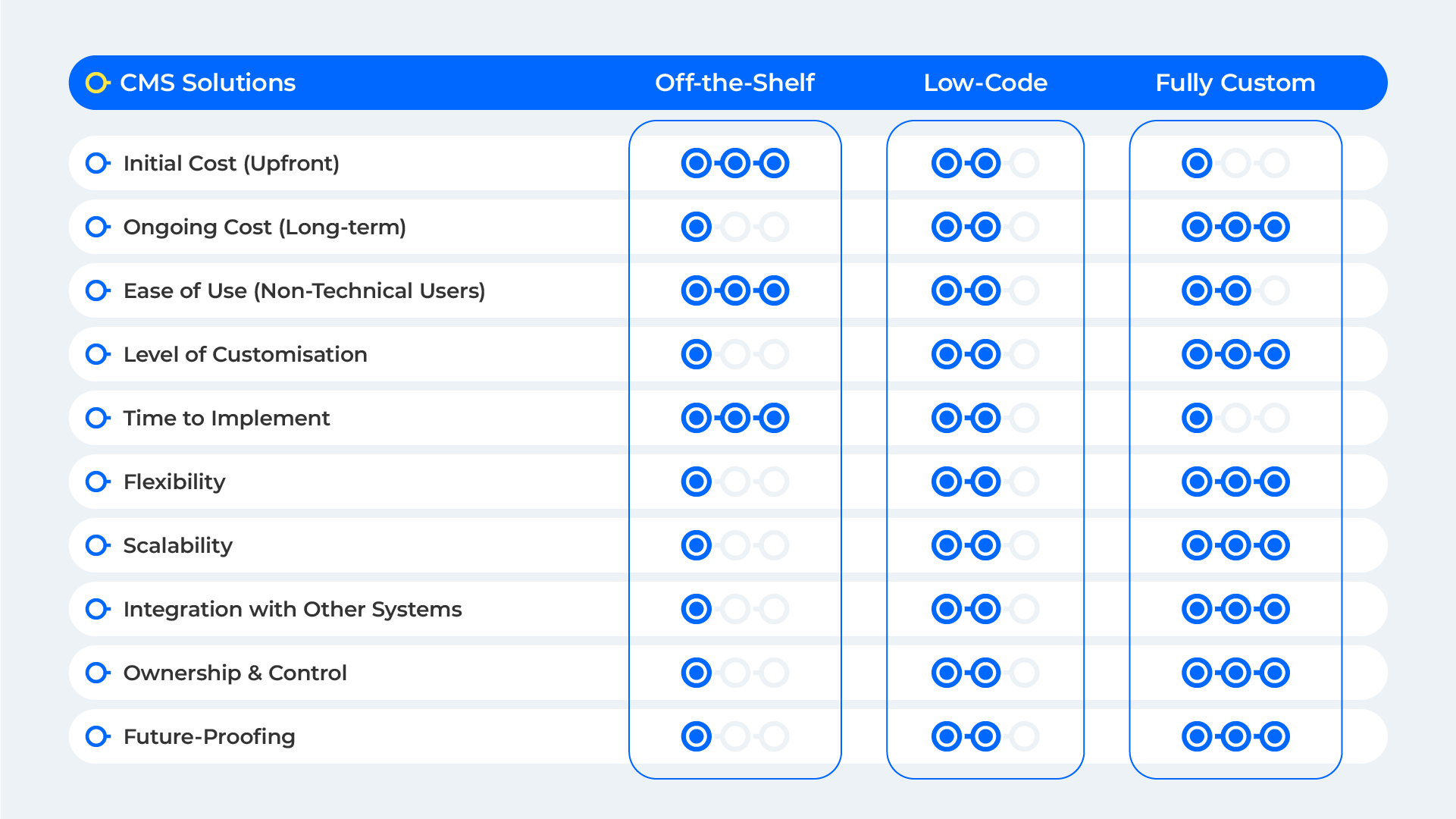
A CMS typically works as two systems.
The content management application is where content teams create, edit and manage content. The content delivery application then takes that content from the database and delivers it to websites, apps and other digital channels. This separation allows the same content to be reused across multiple platforms without duplication.
Modern CMS software relies heavily on APIs, making it easier to connect with other tools, distribute content across multiple channels and support scalable architectures as the business grows.
What do companies need a CMS to do?
For most companies, a CMS is less about flashy features and more about control.
It needs to support content creation, content storage and publishing workflows that work for multiple people. It should manage access levels, approvals and updates without slowing teams down, while remaining flexible enough to adapt as requirements change.
How this plays out depends heavily on the use case.
 Informational websites and content-led sites
For informational websites, a standard CMS is often sufficient.
These sites usually rely on structured pages, reusable templates and straightforward workflows. Drag and drop components make it easier for teams to build websites, update web content and maintain consistent branding without relying on developers for every change.
Online stores and e-commerce platforms
E-commerce adds another layer of complexity.
As online stores scale, the CMS often needs to integrate with other tools, plug ins and a shared database to manage products, content and media efficiently. For simpler setups, standard CMS options can work well. For more complex requirements, customisation or integration becomes essential.
Publishers, portals and complex digital experiences
Publishers and portals typically deal with high content volumes, multiple contributors and more complex workflows.
These use cases often benefit from a headless CMS, where content is managed separately from presentation. This approach offers greater flexibility when delivering digital experiences across multiple channels, particularly when content needs to appear on websites, apps and other platforms at the same time.
Key features of a modern content management system
Some CMS features matter more than others.
In practice, the most useful ones include clear workflows, secure content storage, role-based access control, a usable interface and support for managing files and digital assets in a collaborative environment. These features reduce friction for content teams and make the system easier to maintain over time.
Standard off-the-shelf CMS platforms
Off-the-shelf CMS platforms are often dismissed too quickly. Not because they are inherently limited, but because they are frequently used without enough thought.
When chosen and implemented properly, a standard CMS can support robust, scalable and well governed digital platforms. The real challenge is understanding what the platform should do, how it fits the organisation and where configuration should stop.
WordPress and our approach
WordPress is the platform we most often recommend and deliver projects on.
Used well, WordPress is not just a website builder. It is a flexible content management system that can support structured content, complex publishing workflows and long term maintainability. It works particularly well for informational websites, content led platforms and organisations that need editorial control without constant developer involvement.
Our involvement typically goes beyond initial setup. We help clients design the content model, define templates and components, establish governance and configure the platform for performance, security and longevity. This includes careful use of plugins, sensible custom development and a focus on keeping the system maintainable as requirements evolve.
WordPress is especially effective when content needs to be managed by multiple contributors, updated regularly and reused across the site without duplication. When treated as a system rather than a collection of themes, it can support serious digital operations.
Other CMS platforms in the wider landscape
There are many established CMS platforms available, including Drupal, Umbraco, Contentful and Sitecore.
These systems are often positioned for large scale or highly structured digital environments. In practice, they can be effective in the right context, but they also tend to introduce additional complexity, cost and long term maintenance overhead.
Our approach is not to recommend platforms based on reputation or feature lists, but to focus on solutions we know we can support responsibly. For most of the use cases we work on, WordPress offers the right balance of capability, control and maintainability.
Example in Practice
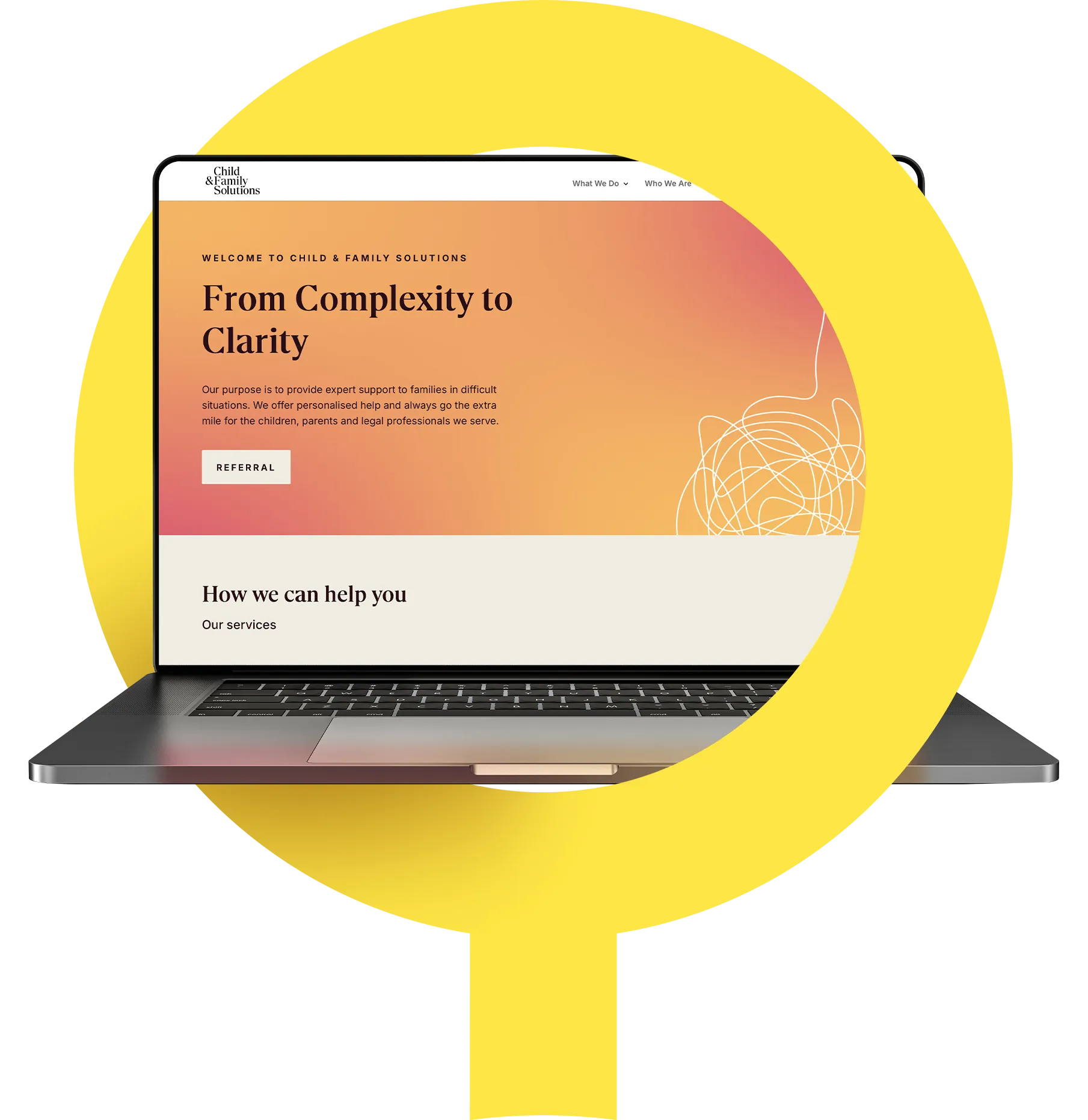
Child and Family Solutions needed to replace an outdated website with a modern, maintainable platform that did not require custom development. We built a new WordPress site using Divi, working within an existing brand framework and focusing on clarity, performance and ease of content management. Since launch, the site has supported a noticeable increase in enquiries while remaining simple to manage day to day.
Low-code CMS platforms and our involvement
Low-code CMS platforms
Low-code CMS platforms sit between traditional content management systems and fully custom development, supporting speed, flexibility and operational clarity.
Our low-code work focuses on platforms such as Zoho Creator within the Zoho One ecosystem, Monday.com and Jira, where content, workflows and structured data need to work together. These low-code CMS platforms are particularly effective for internal platforms, operational tools and content driven workflows that require ongoing evolution without heavy development overhead.
Alongside these, there are a number of low-code CMS platforms commonly used by marketing teams for visual website management and rapid iteration. These include Webflow CMS, Craft CMS, Ghost, Statamic and Storyblok. They are often suited to campaign driven sites and content updates, but typically require careful structure as content grows.
The value of low-code CMS platforms comes from choosing the right tool for the context and applying it with intent, rather than defaulting to visual builders or speed alone.
When a custom CMS is the better option
Sometimes, off-the-shelf CMS options introduce more constraints than benefits.
Custom content management systems are often the right choice for highly scalable platforms, complex portals or niche use cases. In these setups, content is stored as structured data, delivered via APIs and supported by dedicated server and database infrastructure.
The aim is not to over-engineer, but to create a system that fits the product, the workflows and the long-term direction of the business.
Example in Practice
Greyhound Homing and News UK required a bespoke content management system to support a high volume of structured content, regular updates and multiple content contributors. We delivered a custom CMS designed around their specific publishing and operational workflows, allowing content to be managed as structured data rather than static pages. The result is a scalable platform that supports ongoing growth without compromising usability or control.

Frequently asked questions about content management systems
What does content management software do?
Content management software helps teams create, manage and publish digital content without needing to rebuild a website every time something changes. It provides a central place to update pages, manage media and control how content is published across websites and other digital channels.
At its best, a CMS simplifies everyday content work and keeps things organised as content volumes and teams grow.
Do I need coding for a CMS?
In most cases, no.
Modern CMS platforms are designed so non-technical users can create and update content through visual interfaces, templates and workflows. Coding is usually only required when custom functionality, integrations or more complex changes are needed.
In practice, a CMS reduces reliance on developers for day-to-day updates, rather than removing them entirely.
Is WordPress a CMS?
Yes. WordPress is a content management system.
It allows users to build websites, create and publish content and manage updates without writing code. It is one of the most widely used CMS platforms, largely because it balances flexibility with ease of use.
What is a CMS example?
A common CMS example is WordPress, which is used for everything from simple informational websites to content-heavy sites and online stores. Other examples include Drupal, Umbraco and headless CMS platforms such as Contentful.
The right example depends on what you need the CMS to do.
Is a CMS the same as a CRM?
No, they serve different purposes.
A CMS is used to manage and publish content, such as web pages and media. A CRM is used to manage customer data and relationships. While the two systems often integrate, they are designed to solve different problems.
What are the key features of a CMS?
Key features include content creation tools, workflows, content storage, access control, media management and publishing controls.
How modern content management systems work?
A content management system (CMS) typically consists of two core components: a content management application (CMA) and a content delivery application (CDA). The CMA is used to create, edit and manage content, while the CDA delivers that content to websites, apps and other digital channels.
Modern CMS platforms store content as data in a database and deliver it via APIs, allowing the same content to be reused across multiple platforms using a create once, publish everywhere approach. This separation makes it easier to support websites, mobile apps and other digital experiences from a single system.
CMS platforms streamline content creation by providing authoring tools, editorial workflows and publishing controls. Automated and asynchronous workflows allow multiple team members to collaborate without needing to work at the same time, while role-based access control helps manage permissions securely.
Depending on the architecture, CMS platforms may be coupled, decoupled or headless. A coupled CMS, often referred to as a traditional CMS, combines the front end and back end in a single system. A headless CMS separates content from presentation, offering greater flexibility in how content is delivered, but typically requiring more technical effort to implement.
Modern CMS platforms increasingly integrate with digital asset management systems and other tools, centralising files, media and content in a single secure location. Many also include native or integrated AI capabilities for content generation, automated tagging and SEO optimisation.
As organisations grow, a CMS can scale through plugins, extensions and integrations, supporting more content, more users and more complex digital operations over time.

Ready to Implement the Right CMS for You?
Collaborate with Blue Tea to develop bespoke solutions that fit your workflows, evolve with your growth and deliver measurable impact.